How to find a sports coach near you
Post what you're looking for, free: the sport, your town and who it's for. Coaches near you apply, and you chat with the ones you like. Here's how it works.
· Updated
Looking for a tennis coach for yourself, swimming lessons for your child, or someone to coach your school's team? Instead of searching for coaches one by one, post what you need on UNAFFI. It's free and takes about two minutes. Coaches who work in your sport and area see your request and apply to you, and you chat with the ones you like.
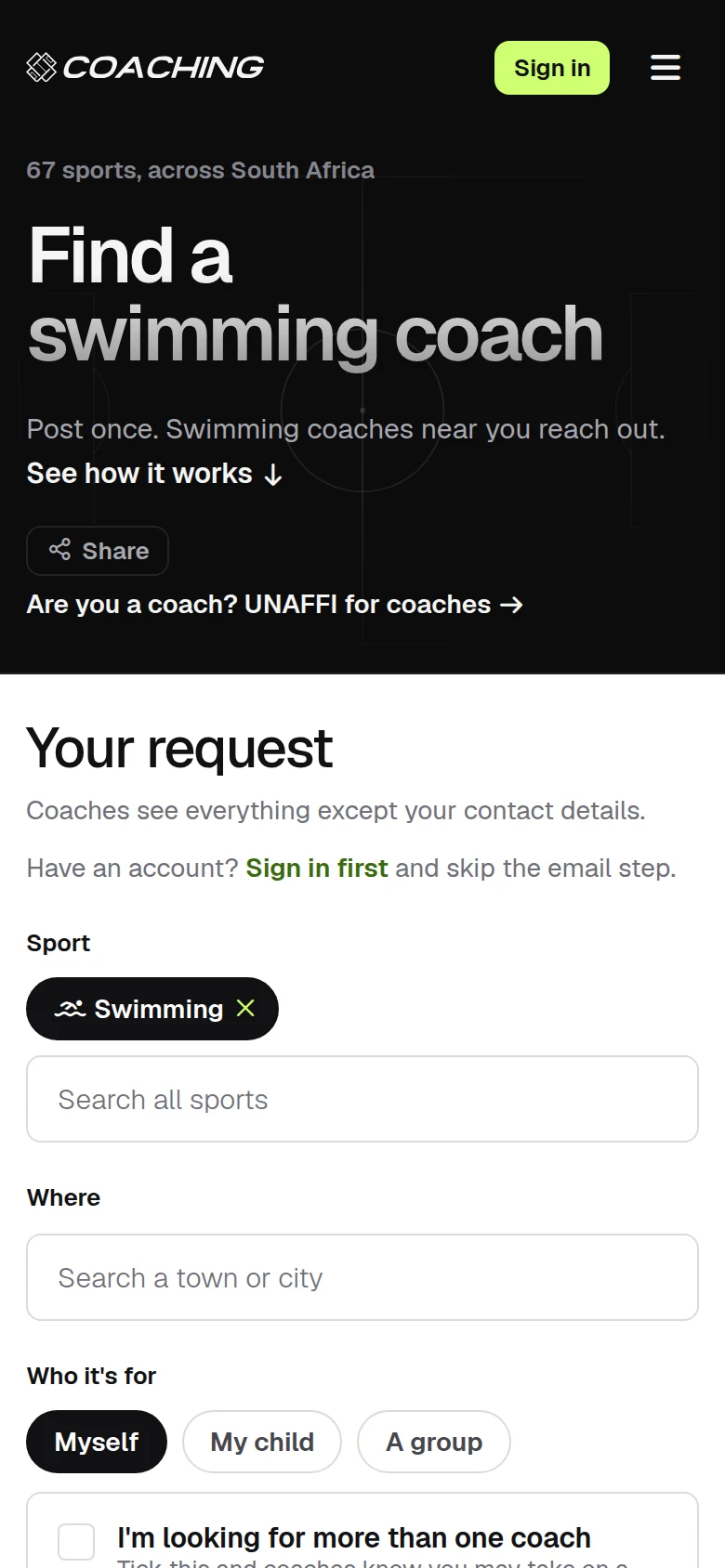
1. Say what you need
Go to Find a coach (or straight to your sport, like swimming or tennis) and fill in your request:
- Sport: one or more. Not on the list? Type it in.
- Where: your town or city (more than one if you like), anywhere in South Africa.
- Who it's for: Myself, My child or A group. Tick "I'm looking for more than one coach" if you're happy to take on a few.
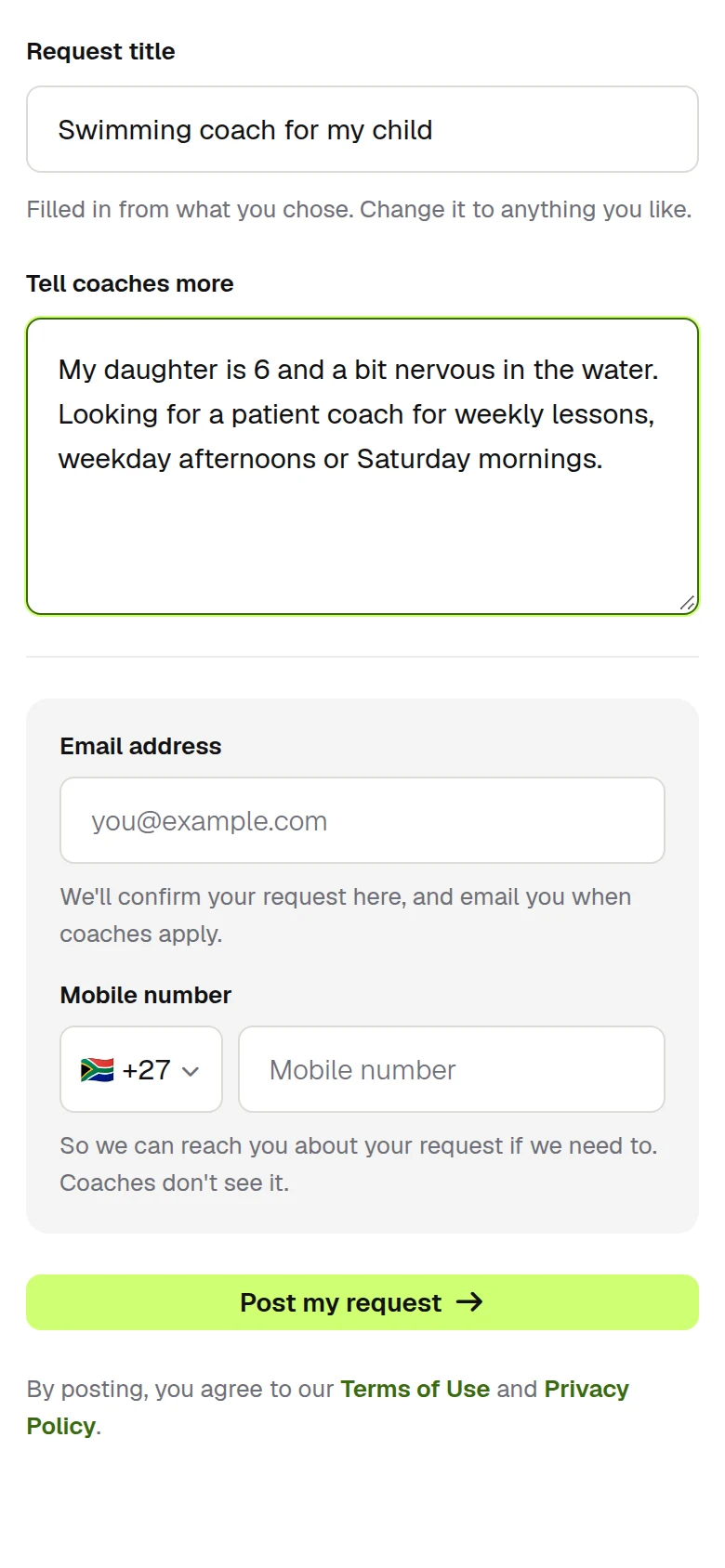
- Request title, filled in from what you chose ("Swimming coach for my child"). Change it to anything you like.
- Tell coaches more: their age and level, the days and times that suit you, where you'd like to train. The more you say, the better the coaches can answer.
Last, your Mobile number. It's for UNAFFI, so we can reach you about your request if we need to. Coaches don't see it. Then press Post my request.
2. Confirm it, and it's live
Not signed in? Give your email address, and we'll email you a link to confirm your request. Press Confirm my request in it (the link works for 7 days) and your request is live. That also sets up your UNAFFI account: sign in with the same email address to manage it. Forgot? We remind you the next day. Signed in, there's nothing to confirm: it goes live straight away.
3. Coaches apply to you
Coaches who work in your sport and area see your request and apply with a short message: how they'd coach you, when they're free, and often their rates. A team applies under its own name, and says which of its coaches would coach you. We may also send your request to coaches near you who aren't on UNAFFI yet: what you need, where and for whom, never who you are. We let you know each time a coach applies. Coaches see your request and your name, but not your email address or mobile number, unless you share them.
4. Compare them and chat
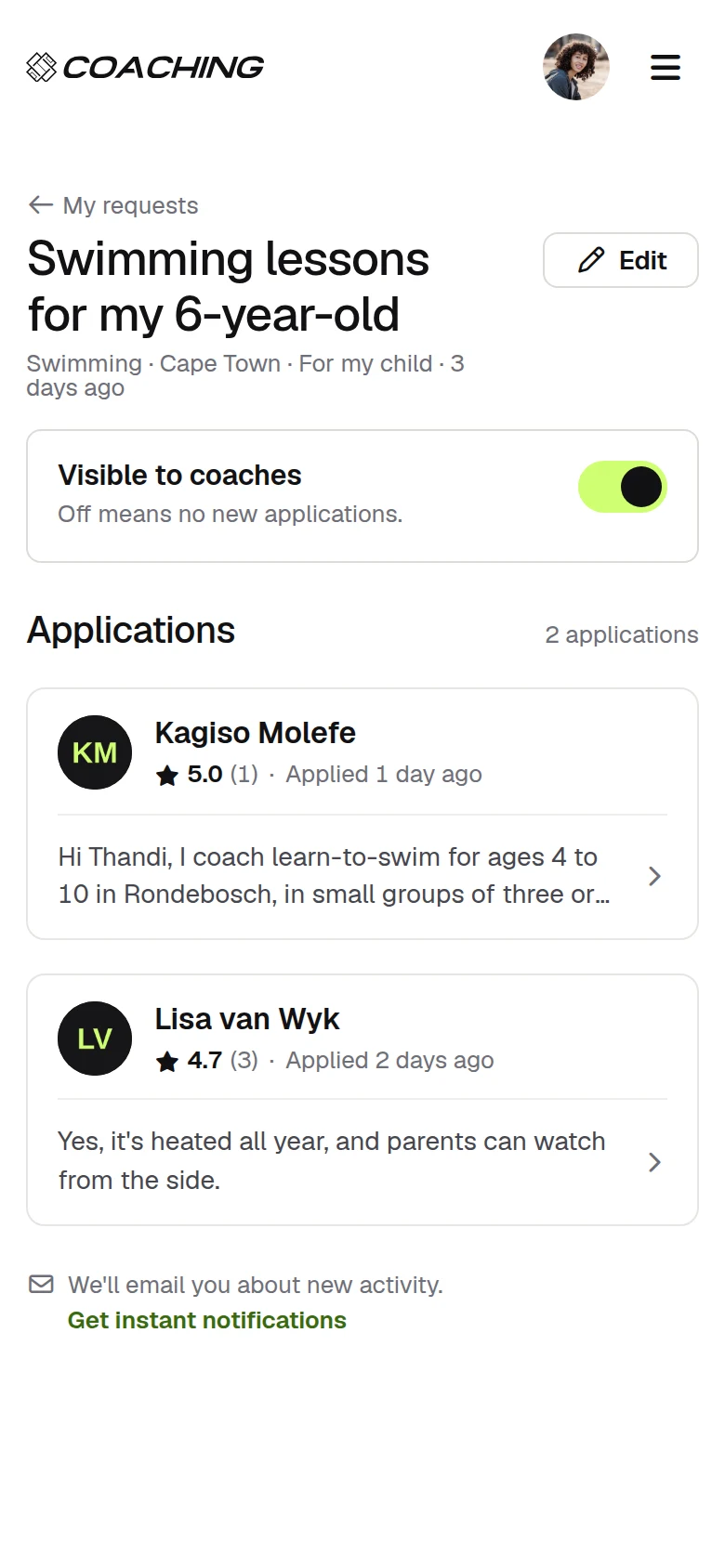
Open your request (under My requests, in your account) to see who's applied. Each application shows the coach's name, photo and rating, when they applied, and the last message; a team shows its logo and the coaches it's putting forward. Open one to chat, and tap the coach's name to read their profile: their sports, where they coach, about them, their prices, qualifications and photos, and their reviews. A coach in a team links to its team page, with the rest of its coaches.
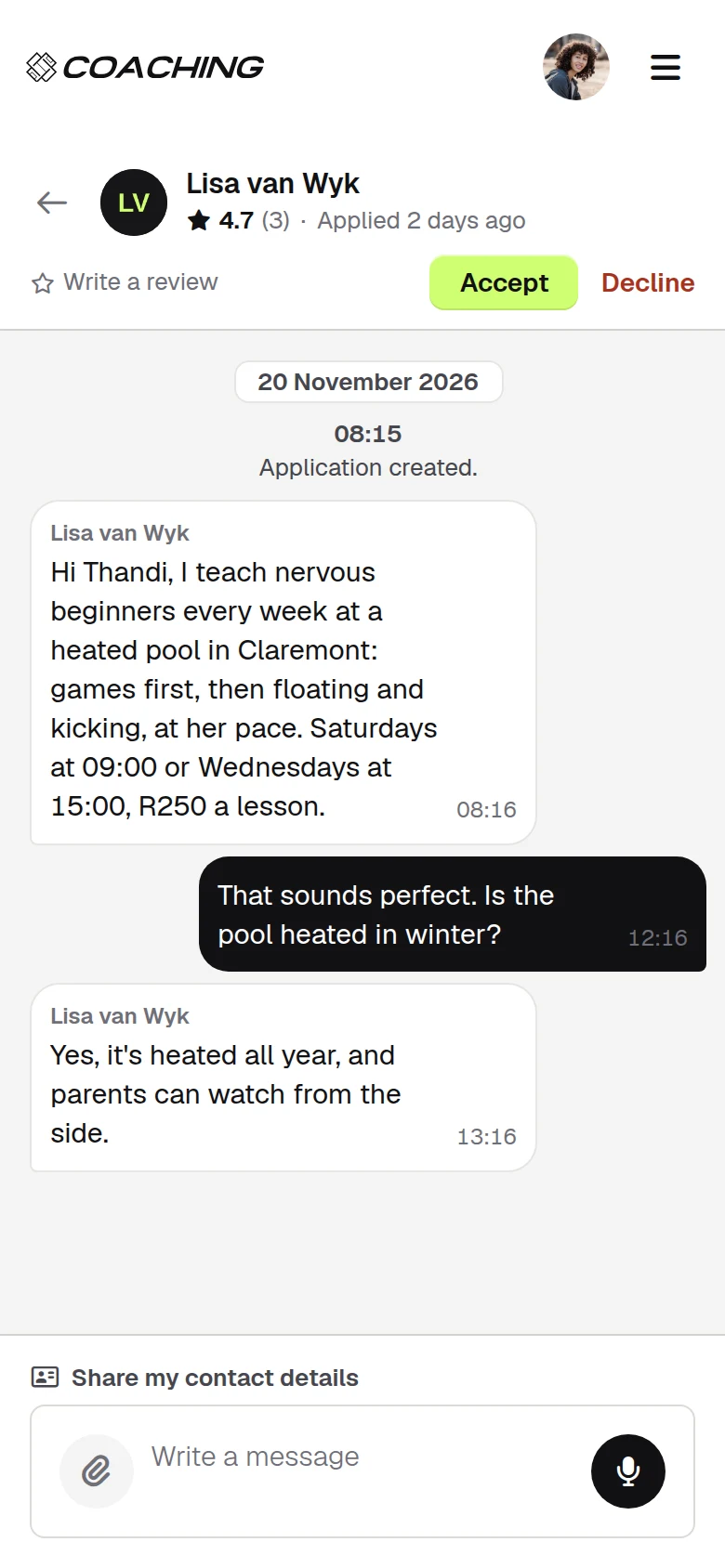
Ask whatever you need to know: their experience, where and when, what they charge. When you've found the right coach, press Accept, and they're told so they can arrange your first session. Decline the ones you don't want, so they know. Declining closes that chat until you press Restore, and an accepted coach can go Back to pending. Leave applications waiting for three days and we'll remind you, twice at most. A coach's application you never open is withdrawn after 14 days.
5. Give a coach your details
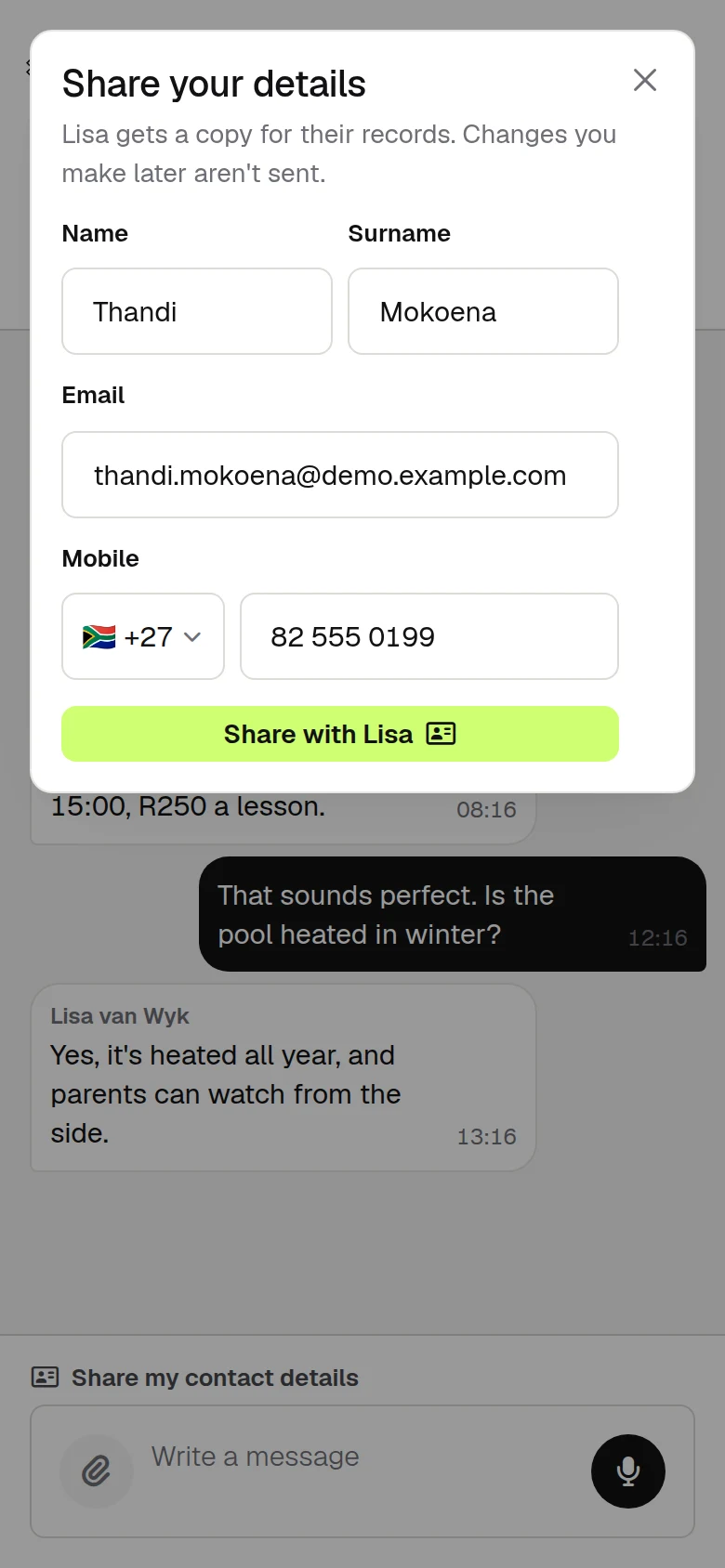
Ready to talk on the phone or WhatsApp? Press Share my contact details under the chat. Your name, email address and mobile number are filled in from your account and your request: change them, or leave out the email address or the number (one of the two will do), and press Share with… button. Your coach gets a copy, once, for their records; changes you make later aren't sent. Until you share them, coaches never see your email address or number.
6. Your coaching, in one place
Once a coach takes you on, they can add you (or your child) as a client, linked to your UNAFFI account. Coached by someone you found another way? Their emails (an invoice, a statement, shared notes or a session reminder) carry a personal link, and they can send you one on its own. Open it, sign in with the email address it came to, and press Link to my account. Then it's all in your account, under Me:
- Sessions: your upcoming sessions, or your children's, with where, when and who's coaching, and the session's workout if your coach gives it one, where you can log your scores. Sync to your calendar app puts them in Google Calendar, Apple Calendar or Outlook.
- Bookings: the sessions you booked on a coach's or team's page, to see or cancel.
- Invoices: every invoice, unpaid first, each with its PDF. Tick several, even from different coaches, and pay them together.
- Coaches: who coaches you or your children, and the notes they share with you. Unlink yourself or one child at a time.
If your coach sends session reminders, they reach you as a notification on your phone or by email.
7. Review your coach
Once you've been coached, leave a review: from the chat (Write a review) or from the coach's profile; for a team, review each coach from their profile. Rate them out of five, and add a comment and photos if you like. It's one review per coach, your overall view of them, and you can change it or delete it at any time. It helps the next person choose.
8. Your request, your way
Under My requests, Manage request opens one: Edit changes what it says, and switching Visible to coaches off once you've found your coach means no new applications and no more reminders about waiting ones. The chats you have stay open. Requests don't expire, so it's up to you.
Or book a session yourself
Some coaches and teams have sessions you can book straight from their page, a class or a free taster say, and pay online. See how to book a session.
Choosing a coach: a few tips
- Read their reviews, and look at how many there are as well as the stars.
- Ask about their experience and qualifications: UNAFFI doesn't check coaches' qualifications or backgrounds.
- For a child, ask where the lessons are and whether you can watch.
- Agree on the price, the place and the times in the chat before the first session.
- Start with one session to see how it goes.
- Share your contact details only with a coach you've chosen.
Questions
Is it free to post?
Yes. Posting is free. Coaches set their own rates, and you agree on them directly in the chat.
Do I need an account to post?
No. Give your email address and mobile number, and confirm your request from the email we send you. It goes live, and that sets up your UNAFFI account for managing it. If you're signed in, it goes live straight away.
Will coaches see my phone number or email address?
No. Coaches see your request and your name, but not your email address or mobile number. If you want a coach to have them, press Share my contact details in your chat with them, and they get a copy. UNAFFI only uses your number to reach you about your request.
Can I find a coach for my child or a team?
Yes. Choose who it's for when you post: yourself, your child or a group, like a school team or a group of friends.
How long does my request stay up?
Until you take it down. Switch off "Visible to coaches" on your request when you've found your coach: no new applications come in, and we stop reminding you about waiting ones.
Where do I see my sessions and invoices?
In your account, under Me, once your coach links you: Sessions (in your calendar app too), Invoices (pay several at once, even from different coaches) and Coaches, with the notes they share.
What if I don't answer a coach?
We remind you after three days, twice at most. An application you never open is withdrawn after 14 days.
Does UNAFFI check the coaches?
UNAFFI doesn't check coaches' qualifications or backgrounds. Read each coach's profile and reviews, and ask about their experience and qualifications in the chat before you agree.